Tip of the Week: Missing the ‘Press Y to Show All’ Prompt
This Week’s Pro Tip: If you’re using the free Decky plugin and only seeing the first 100 games in your Epic/GOG library, look for the “Show All” prompt at the bottom of the screen!
Note: This tip applies to the free Decky plugin version. Junk Store 2.0 (Professional version) loads up to 1000 games automatically.
The Problem
You’ve installed Junk Store and your Epic/GOG games are syncing perfectly, but you can only see games alphabetically from A-L. Games starting with M-Z seem to be completely missing, even though you know you own them.
This is a very common support question we get, and there are two main causes: people simply don’t notice the prompt, or CSS Loader themes are hiding it.
Why This Happens (Decky Plugin Optimization)
The Simple Solution
Just Press Y!
- Open your Epic/GOG library in Junk Store
- Navigate out of the search field (scroll down to highlight any game in the list)
- Look for the “SHOW ALL” button in the bottom menu (highlighted in red below)
- Press the Y button on your Steam Deck
- Wait a moment while your complete library loads
- The rest of your games will now appear!
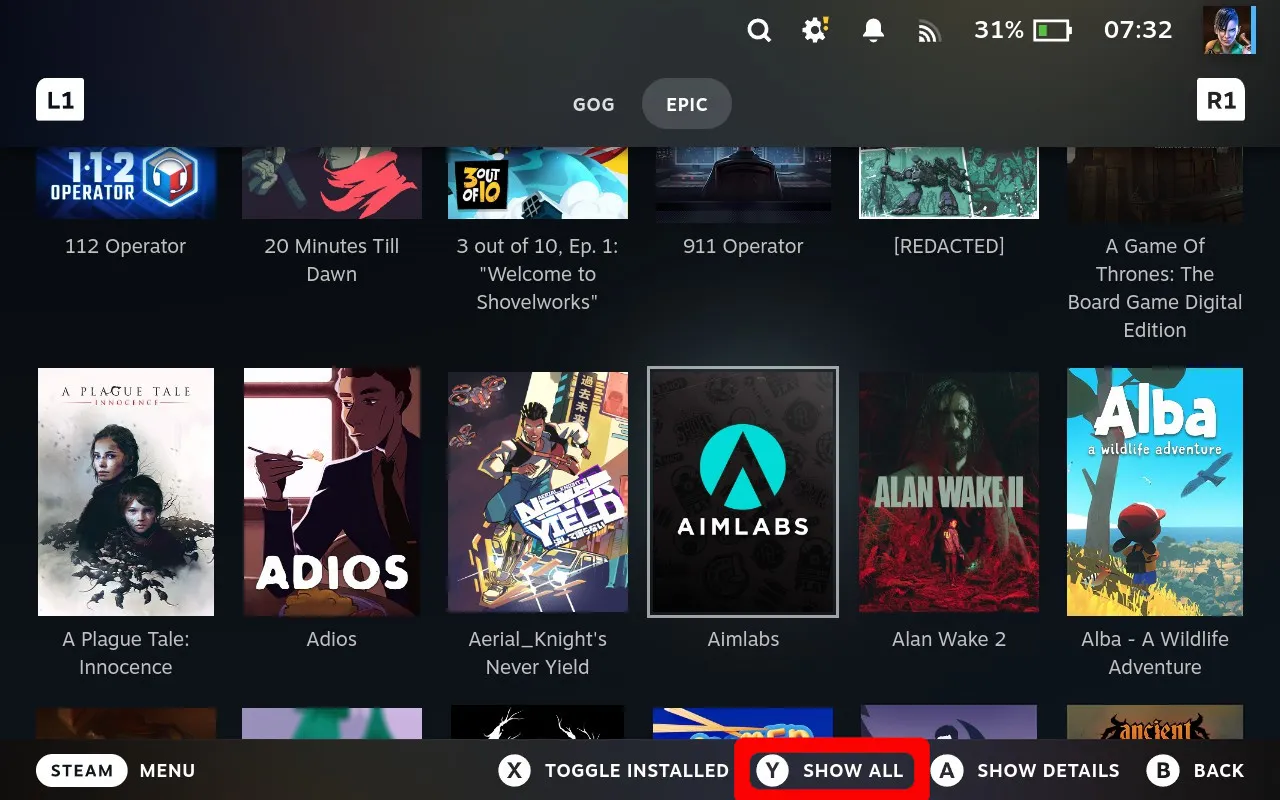 The “SHOW ALL” button is located in Junk Store’s bottom menu - press Y to load your complete library!
If You Can't See the Prompt
Check Your CSS Loader Theme
Sometimes CSS Loader themes hide or modify the bottom menu area where this prompt appears:
- Temporarily disable your CSS theme (CSS Loader → Turn off theme)
- Navigate back to your Epic/GOG library
- Move out of the search field (scroll down to highlight a game) - the bottom menu should now appear with “SHOW ALL”
- Press Y to load your complete library
- Re-enable your theme if desired
Can’t see the button? You can still search for specific games by name - Junk Store’s search function works even when the “SHOW ALL” prompt is hidden.
Pro Tips
Next Week Preview
Coming next week: Dive into Junk Store’s Many Menus - Start exploring what’s inside the different configuration options and game settings throughout your Decky plugin interface!
Hope this tip helps you access your complete game library! If you have any questions or run into issues, don’t hesitate to reach out through our community channels.
Cheers,
The Junk Store Team
Ready for an all-in-one launcher?
🚀 Try Junk Store 2.0 Free for 7 DaysLess tweaking, more gaming — that's the 2.0 difference
Have questions about this tip? Join our community on Discord or Reddit!